Add New Page

  • OVERVIEW

    Creating new content with a page.

    SUMMARY

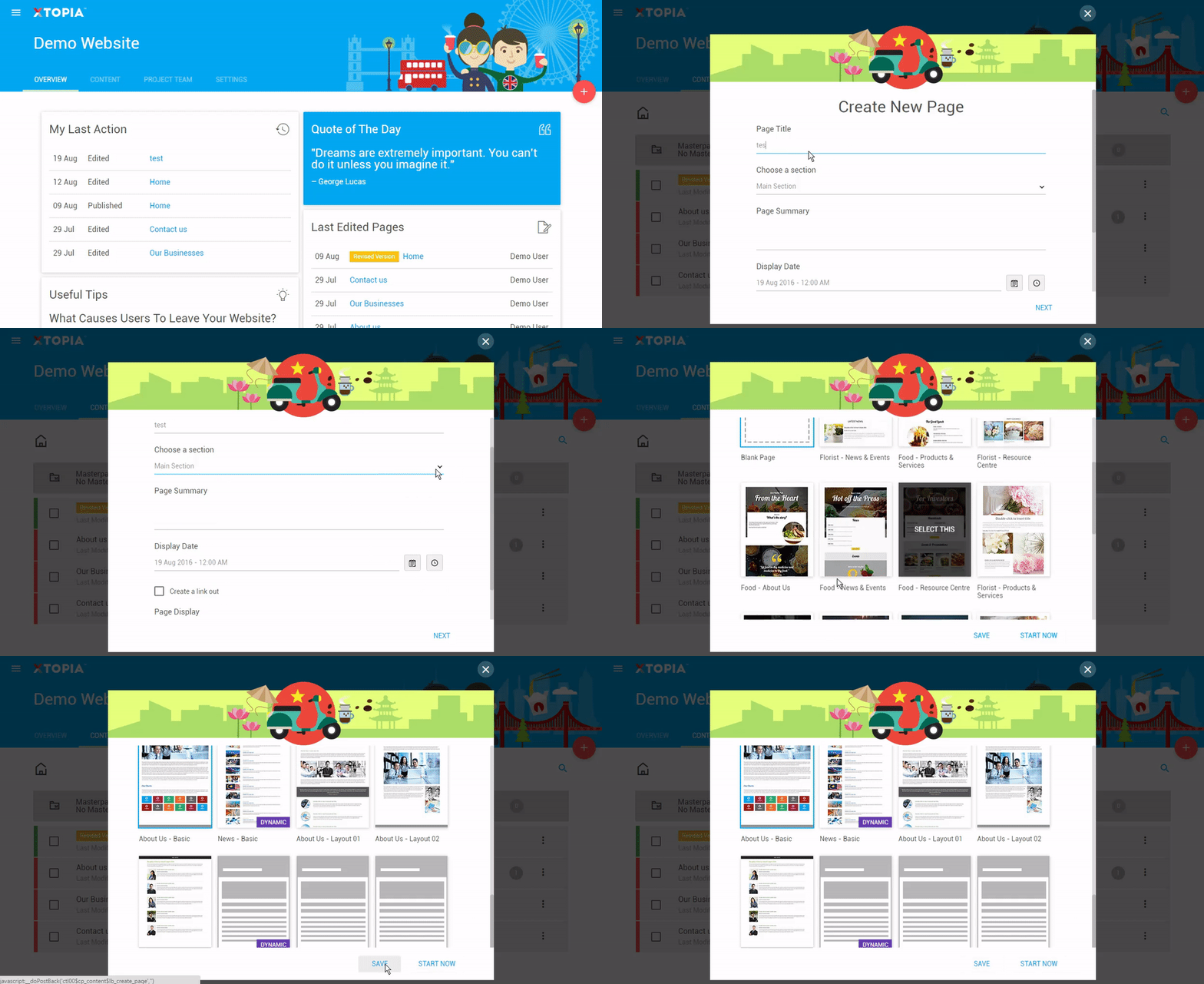
    All content in a website are hosted in pages. To add a new page, follow the steps below:

    STEP BY STEP

    1. Choose your project (this step is only available for users with multiple projects). Click on “Content” on the dashboard navigation.
    2. Click on the “+” button.
    3. Fill up your page details through the guided steps.
    4. Once completed you can either:
    5. a. Click save to continue on create more page.
      b. Or click start now to build your page element in XTOPIA editor.


    Note: All new pages will be inactive by default.

  • OVERVIEW

    Creating new content with a page.

    SUMMARY

    All content in a website are hosted in pages. To add a new page, follow the steps below:

    STEP BY STEP

    1. Choose your project (this step is only available for users with multiple projects). Click on “Content” on the dashboard navigation.
    2. Click on the “+” button located at the top right.
    3. Fill up your page title & summary through the guided steps.
    4. Click save to create a page.


    Note: All new pages will be inactive by default.

Related articles

let us help you

Can't find what you're looking for?
Ooops!
Generic Popup2