Preview A Page

  • OVERVIEW

    A quick look at your page with a click.

    SUMMARY

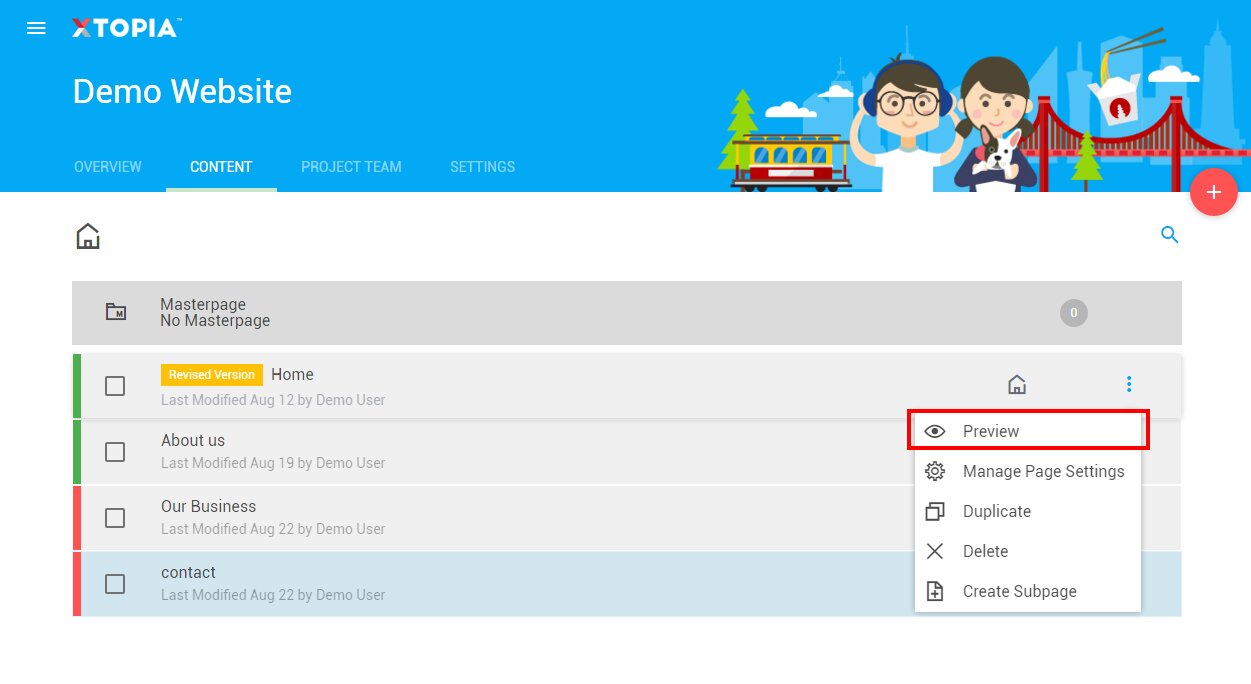
    To view your page instantly from the platform, follow these steps:

    STEP BY STEP

    1. Choose your project (this step is only available for users with multiple projects).
    2. Click on “Content” on the dashboard navigation.
    3. Look for the page you want to preview.
    4. Hover on the eclipse icon.
    5. Click on “Preview”.
    6. The page will be opened in a new tab on your browser.

  • OVERVIEW

    A quick look at your page with a click.

    SUMMARY

    To view your page instantly from the platform, follow these steps:

    STEP BY STEP

    1. Choose your project (this step is only available for users with multiple projects).
    2. Click on “Content” on the dashboard navigation.
    3. Look for the page you want to preview.
    4. Hover on the eclipse icon.
    5. Click on “View Page”.
    6. The page will be opened in a new tab on your browser.

Related articles

let us help you

Can't find what you're looking for?
Ooops!
Generic Popup2