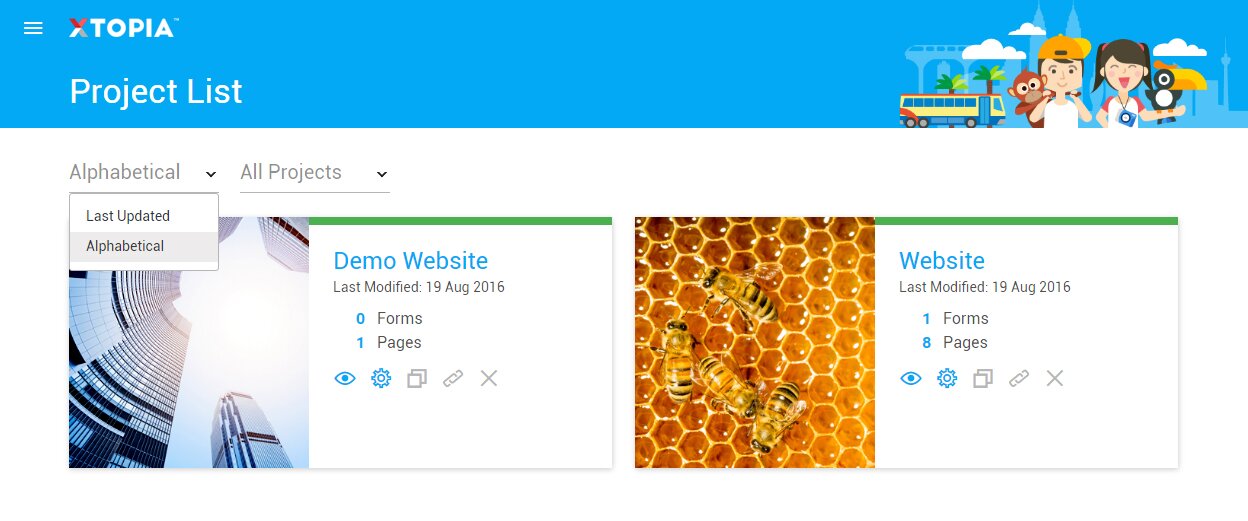
Filter The Project By Last Updated

  • OVERVIEW

    Filter the project list by the last updated date.

    STEP BY STEP

    1. Click on the burger menu on top left.
    2. Click on the Project in the menu.
    3. On the first dropdown select the Last Updated option.


    Note: This feature is only available for users with more than one project in an account.

  • OVERVIEW

    Filter the project list by the last updated date.

    STEP BY STEP

    1. Look at projects sort by on the right side.
    2. On the first dropdown select the Last Updated option.


    Note: This feature is only available for users with more than one project in an account.

Related articles

let us help you

Can't find what you're looking for?
Ooops!
Generic Popup2